Showing posts with label Studio J. Show all posts

Friday, March 7, 2014

MARCH SPECIAL!! Studio Savings

Studio Savings

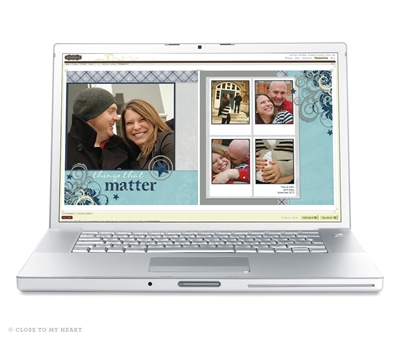
Studio J is awesome!!  I invite you to take advantage of our March special and try Studio J -- the Close to My Heart digital scrapbooking studio.  Click here or click on the tab at the top of  the page to enter the studio.  You can play for free in the studio.  You pay nothing and there is nothing to download to your computer.  You can upload your photos, select your design & kit -- and see how easy it is to create beautiful layouts.  You pay when you place your layout(s) in your shopping cart and check out.  Your layout will be printed on the highest quality photo paper and shipped directly to you within days of ordering.  I recommend uploading 5-10 photos and creating a layout to see how it works.  Once you try it, you'll see how fast & easy you can create -- this may be your answer to wanting a beautiful scrapbook without the time for traditional scrapbooking.  

I love Studio J!   I use Studio J layouts to create many layouts quickly, whether I am catching up my own scrapbooks or ordering multiple copies of my artwork for family and friends.  I can upload my digital photos and create beautiful layouts in minutes.

I want everyone to get familiar with this fun and easy way of creating -- so I AM OFFERING AN ADDITIONAL SPECIAL for the month of March only.  Not only will you receive every layout you create this month for just $5., I will reimburse you $5. for every friend you refer to my blog who purchases a Studio J layout from me.  So get the word out about the studio and you and your friends can create layouts at a huge discount or even for FREE!  (Be sure and let me know who you've referred!)

During the month of March, order your Studio J™ layouts for only $5 — that’s over $2 off the regular price! Create gorgeous, personalized studio layouts in minutes using our wide selection of papers, collections, patterns, and embellishments. And don’t forget to check out our new Photo Express Collection, which allows you to design layouts entirely using your own photos. You’ve taken the photos. Now keep the memories™.

Wednesday, February 13, 2013

Studio J February Special


Now is the time to try digital scrapbooking!  
This month we have the best price ever offered for Studio J Layouts -- only $5 each!  
** THIS OFFER EXTENDED UNTIL MARCH 15 **

I am a "traditional" scrapbooker and love to create pages with my paper, embellishments and printed photos.  Will I ever go totally digital?  Heck no, I have too much fun playing with all my scrapbooking goodies and visiting with friends at crops.  Do I like to play in Studio J?  Absolutely!  You can choose to create a custom layout or use our Express Collections that are pre-designed for you.  Studio J layouts are fast, easy and extremely affordable.  I have them throughout my albums, mingled in with my traditional layouts.  I have used Studio J layouts to "catch up," to scrap vacations and weddings, to create multiple layouts for family gifts and to create a layout with one of our retired kits.  I am happy to show you how to use Studio J - please contact me.  I believe there are so many benefits to expanding your scrapbooking to include digital layouts, I am sweetening the February special:

When you order Studio J layouts through my blog & website during this month, you will:

RECEIVE ONE FREE STUDIO J LAYOUT FOR EVERY 10 STUDIO J LAYOUTS YOU PURCHASE!  (Must order your free layout during Feb & I will reimburse you with credit.)

RECEIVE A FREE ALBUM OF YOUR CHOICE WHEN YOU 
PURCHASE 20 STUDIO J LAYOUTS! 

Click on the Studio J Scrapbooking tab at the top of the screen to get started.
Note- You can create a Studio J account, upload photos & design layouts for free. 
Your account is not charged until you order your layouts.


Tuesday, October 9, 2012

Studio J® Tricks to Add Flair to Your Layouts


Even though Studio J® is fast and easy to use, it is helpful to know some great tricks that can make customizing your layouts even more exciting. Here are some Studio J tricks straight from our professional Close To My Heart artists:

  • Customize your background and texture paper. You can change the color and intensity of the background and texture paper included in whichever kit you choose. Simply select the piece of background and texture paper, change the color in the color selection tool, and increase or decrease the intensity of the color in that same popup box.
  • Crop My Stickease® quotes, titles, and tags. The cropping feature on the My Stickease images allows you to select a section of a quote, title, or tag to use as a border or other embellishment.
  • Create a customized My Stickease image. If you have a specific image in mind to use as an embellishment on your page, you can create a customized My Stickease to fit your theme perfectly. Simply add a text box, photo hanger, ribbon, ribbon slides, and Stickease to create the little suitcase! So easy! Be sure to crop or send elements behind other elements when necessary, and add several elements together for a unique look!

  • Select more than one element at a time. If you want to move several elements of your layout at once, simply click and drag your mouse around the elements you would like to select. Let’s take buttons, for example. After the buttons have been selected, you can click the icons in the popup box to choose to align the buttons vertically or horizontally if you desire.
  • Make faux washi tape with vellum text boxes. To create the look of a piece of clear washi tape, make a small rectangular text box, filled with vellum background (this is the default color for text boxes). You can make the tape strips as large or small as you want, or even layer them for more emphasis.

  • Stretch one photo across multiple photo wells. If you have fewer photos than photo wells, instead of deleting the excess wells, try scaling the picture to a larger size and then copying the picture to other photo wells and matching the photos up until they align with an almost seamless image. This trick works best with photo wells that are adjacent to each other.
  • Create ruffled ribbon. Select “Ribbons” in the drop-down menu under the Embellishments toolset. Choose ribbon tab and rotate the tab so that it is vertical on the page. Then layer several tabs on top of one another, sending every other one to the back to create a ruffled look.

  • Create a jagged border with text boxes. You can create a jagged border simply by rotating multiple text boxes about 45 degrees and making them the same color as the background. Put these boxes on top of a long, rectangular box of another color, and you’ve got a jagged border!
  • Change the background of your layout. Sometimes you may like the photo and journal arrangement in a layout, and yet want to change the background colors. Because photos sit on top of everything else, this is easy to do. Simply pull a journaling box over the space you want for a different background and fill it with a color from the color selection tool or a patterned paper from the Papers toolset. Then, send it backwards until the photo wells are on top of your new background.
  • Bonus Trick! Use keyboard keys to make embellishments. Did you know that some of the best tools for creating custom embellishments are the basic keys on your keyboard? It’s as simple as typing into a journaling box with no background color. Use periods to make a polka dot pattern, angle brackets to create a trendy Chevron look, overlapping pound signs to make burlap, question marks to make rope, and so much more!

Monday, October 1, 2012

October Specials - FREE Studio J Layouts!


GET 4 FREE STUDIO J LAYOUTS!
Get a free Studio J® layout in October! In this special promotion, you will receive a free custom-printed layout when you buy 9 custom-printed Studio J layouts. To receive the discount, just add 10 or more layouts to your cart. You’ll see a discount reflected in your order total. And you can totally take advantage of this promotion by ordering in multiples of 10. Buy 9, get 1 free. Buy 18, get 2 free. Buy 27, get 3 free. Up to 4 free layouts! It’s a great time to use any Member Bonus layouts you may have. If you haven’t tried Studio J yet, now is the time to start! Click here to enter Studio J.

Have you seen the Studio J® Express Collections?  Click on this video to find out more:

Tuesday, January 3, 2012

January Special - Studio J


A Perfect 10! During the month of January, Studio J Members who buy 9 custom-printed Studio J layouts receive a 10th layout FREE!! Take advantage of this offer and feel accomplished right at the beginning of a new year. . .